
While its predecessor, MetaTrader 4 (MT4), remains a legendary name in retail trading, MetaTrader 5 (MT5) represents the evolution of that legacy. Developed by MetaQuotes Software, MT5 was designed not as a simple update, but as a superior, multi-asset platform built for the modern financial landscape. For traders looking beyond basic forex, MT5 offers a more powerful, flexible, and technologically advanced environment.
This guide will delve deep into the world of MT5 forex trading, exploring its advanced features, key advantages over MT4, and why it is increasingly becoming the platform of choice for serious traders.
What is MetaTrader 5? Beyond a Simple Upgrade
MetaTrader 5 is a comprehensive trading platform that allows you to access not just the forex market, but also stocks, indices, commodities, futures, and cryptocurrencies—all from a single account. It was built from the ground up with a more powerful core to handle the complexities of today’s diverse markets. Many traders mistakenly see it as just “MT4 with a few extra features,” but this underestimates its fundamental architectural improvements.
Key Advantages of MT5 for Forex Trading
While MT4 was designed primarily for forex, MT5’s broader capabilities directly benefit forex traders with greater depth and precision.
1. Superior Technical and Fundamental Analysis
MT5 provides an unparalleled analytical toolkit that caters to both technical and fundamental traders.
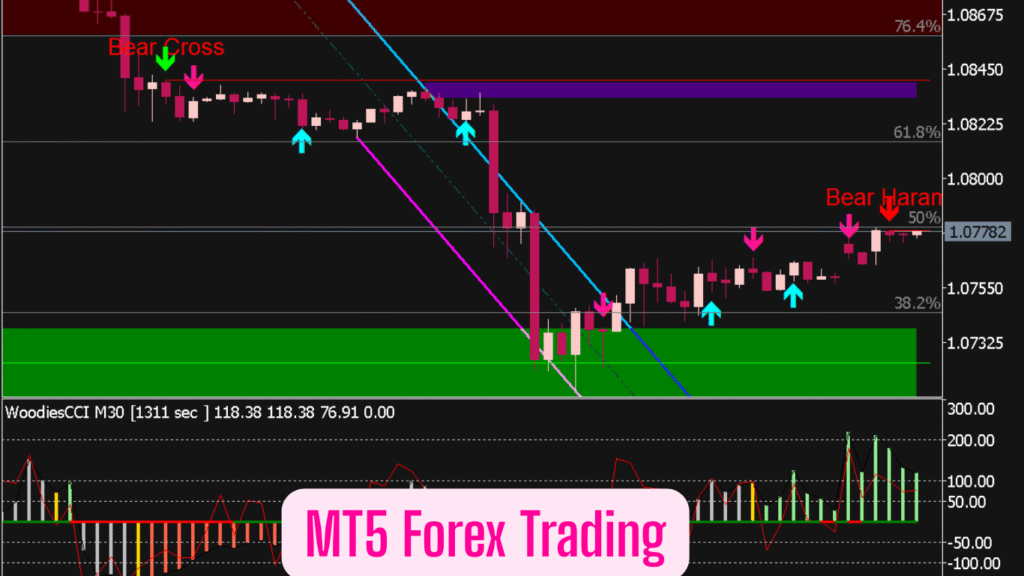
- Advanced Charting Capabilities: MT5 offers 21 timeframes, a significant upgrade from MT4’s 9. This allows for micro-analysis of price movements on tick charts and a broader perspective on long-term trends.
- More Built-In Technical Indicators: The platform comes pre-loaded with 38 technical indicators (compared to 30 in MT4) and 44 graphical objects. This expanded library provides more ways to analyze market trends and patterns without needing to install custom tools initially.
- Integrated Economic Calendar: This is a critical feature missing in MT4. The built-in economic calendar allows you to see high-impact news events directly within the platform, helping you anticipate market volatility and manage risk around major announcements like interest rate decisions and employment reports.
2. Enhanced Order Management and Execution
MT5 provides a more nuanced approach to trade execution, which is crucial for implementing sophisticated strategies.
- Multiple Order Types: Beyond the standard market and pending orders, MT5 supports advanced order types, including Stop-Limit orders. This allows you to set a specific trigger price (stop) and a separate price limit for execution, giving you greater control over your entry and exit points.
- Depth of Market (DOM): The DOM widget provides a real-time, visual representation of the market’s buy and sell orders at different price levels. This insight into market liquidity and order flow is invaluable for gauging supply and demand dynamics.
- Hedging Capability: Unlike MT4’s default netting system, MT5 was built with a hedging model, allowing you to hold multiple positions, both long and short, on the same instrument simultaneously. This is a preferred method for many advanced forex strategies.
3. The Power of MQL5 and a Thriving Ecosystem
The community and technological ecosystem around MT5 are more advanced and continue to grow rapidly.
- The MQL5 Programming Language: MQL5 is a more powerful and modern language than MQL4. It is object-oriented, faster, and allows for the development of more complex and efficient trading robots (Expert Advisors) and indicators.
- The MQL5 Community and Market: The MQL5.community website is a massive hub where you can find thousands of free and paid Expert Advisors (EAs), custom indicators, and scripts. You can also hire developers to create custom tools or even copy trade from successful strategies through the built-in Signals service.
- Strategy Tester with Realistic Back-Testing: The multi-threaded strategy tester in MT5 is significantly faster and more robust. It allows for back-testing on real tick data and includes variable spread modeling, providing a much more accurate simulation of how a strategy would have performed in live market conditions.
MT5 vs. MT4: A Clear-Cut Comparison for Modern Traders
The debate between MT4 and MT5 is ongoing, but the distinctions are clear. The following table summarizes the key differences:
| Feature | MetaTrader 4 (MT4) | MetaTrader 5 (MT5) |
|---|---|---|
| Market Focus | Primarily Forex & CFDs | Multi-Asset: Forex, Stocks, Futures, Crypto |
| Timeframes | 9 | 21 |
| Built-In Indicators | 30 | 38 |
| Economic Calendar | No | Yes, Integrated |
| Order Types | 4 basic types | 6 types, including Stop-Limit |
| Programming Language | MQL4 | MQL5 (Faster & More Advanced) |
| Back-Testing Engine | Single-threaded | Multi-threaded (Much Faster) |
| Hedging | Possible, but not default | Default System |
The Verdict: If you are a trader who exclusively trades forex and relies on a vast library of old, custom MQL4 EAs, MT4 may still feel comfortable. However, for any trader looking for superior technology, more analytical tools, the ability to trade other markets, and a platform built for the future, MT5 is the unequivocal choice.
Getting Started with MT5 Forex Trading
- Choose a Regulated Broker: Select a reputable forex broker that offers the MT5 platform and is regulated by a major authority like the FCA, ASIC, or CySEC.
- Download and Install the Platform: Download the MT5 software directly from your broker’s website or the official MetaQuotes website.
- Customize Your Workspace: Arrange your charts, market watch, and toolboxes to suit your trading style. Set up your preferred color schemes and templates.
- Explore the Features: Spend time in a demo account exploring the economic calendar, Depth of Market, and the different order types. Test the strategy tester with a simple EA.
- Develop a Strategy: Use the advanced tools at your disposal to build, test, and refine a trading strategy that incorporates sound risk management.
Conclusion: Is MT5 the Future of Retail Trading?
MetaTrader 5 is more than just an alternative; it is the logical evolution of the MetaTrader lineage. Its multi-asset capability, advanced analytical tools, faster performance, and powerful MQL5 ecosystem make it a superior platform for today’s traders. While the familiarity of MT4 ensures it will remain popular for some time, the industry is steadily shifting towards MT5. By embracing MT5 now, you are not just keeping up with the times—you are equipping yourself with a more powerful and versatile toolkit to navigate the complexities of the global financial markets.
Disclaimer
This article is for educational and informational purposes only and does not constitute financial advice, investment recommendation, or an offer or solicitation to buy or sell any financial instruments. Trading foreign exchange (Forex), Contracts for Difference (CFDs), and other leveraged products carries a high level of risk and may not be suitable for all investors. There is a possibility that you may sustain a loss equal to or greater than your entire investment. Therefore, you should not invest or risk money that you cannot afford to lose.
FAQs
1. Is MT5 better than MT4 for forex trading?
From a technological and feature standpoint, yes, MT5 is the more advanced platform. It offers more timeframes (21 vs. 9), more built-in technical indicators (38 vs. 30), an integrated economic calendar, a superior strategy tester, and support for more order types like Stop-Limit orders. While MT4 remains popular due to its vast legacy and familiarity, MT5 is objectively the more powerful and versatile platform, especially for traders who utilize multi-asset trading or require deeper analytical tools.
2. Can I use my old MT4 Expert Advisors (EAs) and indicators on MT5?
No, you cannot directly use MT4 EAs or indicators on MT5. MT4 uses the MQL4 programming language, while MT5 uses the more advanced, object-oriented MQL5. The two languages are not natively compatible. However, many popular EAs and indicators have been rewritten in MQL5 by their developers. You can often find MQL5 versions on the MQL5 marketplace, or you can hire a developer to convert your specific MT4 tool for use on the MT5 platform.
3. What is the “Depth of Market (DOM)” in MT5 and why is it useful?
The Depth of Market (DOM), also known as the Market Depth window, is a feature in MT5 that shows you the real-time list of pending buy and sell orders for a financial instrument at different price levels. It provides a visual representation of the market’s liquidity and order flow. For forex traders, this is invaluable for gauging supply and demand dynamics, identifying significant support and resistance levels where large orders are clustered, and understanding the potential for short-term price movements.
4. Does MT5 allow hedging?
Yes, MT5 was built with a hedging position accounting system, which is the default model for many brokers. This allows you to hold multiple positions, including both long (buy) and short (sell) positions, on the same currency pair at the same time. This is a key advantage for traders who employ strategies that require hedging existing positions. It’s important to check with your specific broker, as their configuration of MT5 will determine the available accounting system.
5. I’m a beginner. Is MT5 too complicated for me to start with?
While MT5 has a steeper learning curve than MT4 due to its expanded feature set, it is still an excellent platform for a beginner who is serious about learning modern trading. Its interface is logical and well-organized. Starting with a demo account allows you to explore the features without pressure. Furthermore, learning on MT5 from the outset means you won’t have to transition from MT4 later, and you’ll have immediate access to advanced tools like the economic calendar and superior charting as your skills develop. Many educational resources are tailored specifically for MT5, making the learning process manageable.